News Ticker

Latest Posts
Browsing Category "OS X"

Bootable Installer OS X El Capitan

- No Comments

After OS X El Capitan is available to the public, many are eager to download and install. But not a few people asking how to create a bootable USB installer for OS X El Capitan. Before you go to the tutorial, I explain first glance on a bootable USB installer for OS X El Capitan. 

Bootable Recognize Installer 


Since OS X Lion, Apple no longer sells the operating system in the form of a DVD. In the early days of hell they give OS X Lion Recovery drive for free in the sales package. This exclusive Flash Drive contains installation files for the MacBook Air and MacBook Pro Retina because there is no DVD slot. Its main function is doing a clean install without the need to re-download the document OS X that is larger than 5GB. 

Another function that is not less important is to do a variety of settings such Disky Utility Repair Disk Permissions or can also do Reset Password via Terminal. 

Well getting here, users can also create their own bootable USB fact. Requirement is easy, a minimum of 8 GB Flash Drive and OS X Installer file that can be downloaded from the Mac App Store. How do I make a bootable OS X to your Flash Drive? There are two ways that I know, via Terminal and use the application help DiskMakerX.

Via Terminal, Pretty Hard 

On the Apple Support page actually has no tutorial to make you into a bootable flash drive installer. The concept is simple, you need to download the OS X installer on a Mac computer then call Terminal and run the tools createinstallmedia. 

These are tools that you copy the installer files and eliminate the two step process into a step bootable installation only. Here is an excerpt :
To learn how to use createinstallmedia, use the following command in Terminal: 

OS X El Capitan 

/Applications/Install\ OS\ X\El\ Capitan.app/Contents/Resources/createinstallmedia 

Example: 

sudo /Applications/Install\ OS\ X\ El\ Capitan.app/Contents/Resources/createinstallmedia –volume /Volumes/Untitled –applicationpath /Applications/Install\ OS\ X\ El\ Capitan.app –nointeraction

Easy steps, via DiskMakerX 

Use third-party applications that DiskMaker X With free applications and small size, all these steps will be simplified by pressing a few buttons. Here are the steps : 

1. Download the latest on the page DiskMakerX developers. 

2. Install and prepare documents El Capitan OS X installer you've downloaded in the Mac App Store. 

3. Press the El Capitan (10:11), after it DiskMaker X OS X installer will detect that you have. 
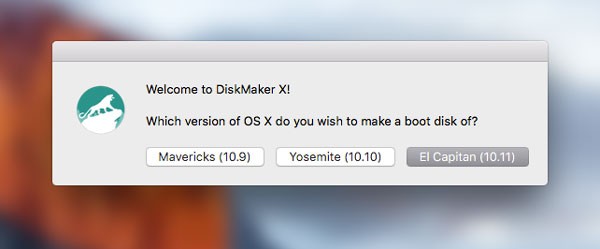

4. Continue this step by selecting the storage media to be formatted and some of the views approvals for further processing. 


5. An important note, the process of creating a bootable installer in DiskMaker X did show a progress bar which is flat, there is no oncoming line. So do not trigger feelings of failure. 


6. Additional troubleshooting, close all running applications when you use DiskMaker X so that the maximum load of RAM can be used by this application. Connect the charger to a Mac computer can also be additional advice to ensure you do not stop the process if it runs out of battery. 


Once completed, the Flash Drive you will display a Finder window as shown above. That means you are ready to use a bootable OS X installer El Capitan to reinstall or repair the troubled OS X on other computer. 

 Download DiskMaker X

iOS 9, OS X el Capitan and watchOS 2 release date

- No Comments


After the initial introduced at WWDC 2105 event, iOS 9 and OS X El Capitan became hot news. A series of beta updates continue to be given and tested by the registered developers and Apple Developer. Well now your wait will soon be over. Apple has announced the release date of iOS and OS X 9 El Capitan for the general user. 

iOS 9 to 16 September 2015 


Wednesday becomes important dates you should mark and prepare spare time. Apple will release iOS 9 to the public on that day. From experience when iOS 8, the time is midnight tomorrow - before the 17th of September. 

If this update is available, users iOS 8.4.1 or iOS versions of the other 8 can menujut to Settings > General > Software Update to download these updates in OTA version. While 9 Beta for iOS users, there is still no clear information about the procedures for downloading the update iOS version 9 public. Moreover, there is now an update iOS 9.1 Beta 1. 

OS X El Capitan - 30 September 2015 


In the event Apple Event yesterday, Apple is not much to discuss about OS X El Capitan. But according to El Capitan Preview page, there is now a caption 'Coming 30 September' at the bottom of the image. 

My suggestion to update OS X, you should be a little more observant and check what applications are still supportive. Do not let applications related to your job so can not be used anymore because of the rush to download this update. 

So how do I download OS X El Capitan? Easy, if this update is available please go to the Mac App Store and go to the Updates tab. Apple certainly present this information in the Featured page anyway, so I guarantee you no trouble finding it. 

watchOS 2 to 16 September 2015 


Apple Event is still sourced from yesterday, watchOS 2 reportedly will be present on 16 September as well. We wait for the presence of the latest operating system for Apple Watch. For you who do not know, a variety of strengths is access to existing sensors in Apple Watch to apliaksi third party, customizable lockscreen, Nightstand mode and a variety of other things.

OS X El Capitan Developer Beta 8 and Public Beta 6

- No Comments

Apple re-released updates for OS X El Capitan. Just as before, this time Apple released two versions directly Developer Beta and Public Beta simultaneously. A member of the Apple Developer can immediately download the OS X El Capitan Developer Beta 8 on page. While members beta.apple.com can obtain versions of OS X El Capitan Public Beta 6. 

There is no significant change in this time of renewal. OS X El Capitan re- refined from the inside, without new things about the look or features. Could this be the last update before OS X El Capitan public version released on 9 September event Apple Event? 

Slightly backward, Apple never made a mistake in the update OS X El Capitan. They pull over El Capitan OS X Public Beta 5 and re- release it a few days later. Time was not only alone, but in conjunction with the presence of El Capitan OS X Developer Beta 7.

OS X El Capitan Developer Beta 7 Release

- No Comments

After pulling over El Capitan updates OS X Public Beta 5, the update now comes back. But not alone because there is also a version of OS X El Capitan Developer Beta 7 were present for registered developers. 


According to 9to5Mac website, this update contains the same as the previous version. The difference is Apple gave the new code build a replacement code earlier versions. 

The fifth public beta has also returned after being pulled yesterday afternoon. That version comes with a build number of 15A262e, which puts it a few builds ahead of yesterday’s 


What are new in this version? Still from the same source, there are a few notes about the display updates that can be enjoyed in both versions. Such as the Welcome screen to Safari to explain the variety of new features in Safari 9 and the About This Mac window that provide X with color logo. And there is also a setting to disable the mouse pointer will be enlarged when you wiggle the mouse quickly. 

Until this update Apple has not given the exact date for the presence OS X El Capitan public version. If returning to the WWDC 2015 event a few months ago, Apple gives the time information in the form of autumn 2015 (around September-October) to bring the latest OS X for free.

Parallels 11 Realese

- No Comments

Developer application virtualization in OS X operating systems vying updates released since Microsoft released Windows 10. Parallels including one, they present a version 11 with a variety of features option. The most important thing is the support for OS X El Capitan to run the Windows 10 operating system virtual. 

Here are some of the latest features of Parallels 11: 

• Run Windows and Mac applications side by side 
• Switch from your PC to your Mac 
• Now Supporting Windows 10 and ready for El Capitan 
• Works with Boot Camp® 
• Not just for Windows 
• One-click tuning 
• Robust Performance 
• Business Class Software 

Besides a variety of features above, there are still some very interesting notes in this latest version. Such as Retina Display support, notification of Windows in Notification Center in OS X, as well as support for USB-C to offer 12 inch MacBook users. 

What about performance? According to records released, Parallels 11 increases the speed of booting and shut down up to 50% (Windows 8.1 and Windows 10). As for the more efficient use of the battery is claimed up to 15%. 

There are three versions that you can select. Parallels Desktop for Home and Student, Pro Edition for Developers and Business Edition for companies. Users can try it out first for free for 14 days and decide to buy later. 

Download  Parallels 11

OS X Yosemite 10.10.5 Update Public

- No Comments

After releasing several updates Developer Beta in a few weeks, eventually OS X Yosemite 10.10.5 public version officially released. In his notes, there are 3 point updates are present this time is connectivity Mail app, repair Photos and Quick Time Player. 
  • Improves compatibility with certain email servers when using Mail 
  • Fixes an issue in Photos that prevents importing videos from GoPro cameras 
  • Fixes an issue in QuickTime Player that prevented playback of Windows Media files. 
However, according to MacRumors page, there are also important records that are not written in the display Apple Mac App Store. Namely closing the security gap from the problem that got crowded DYLD_PRINT_TO_FILE attack some time ago. For those of you who do not know, this security hole recently discovered by Stefen Esser in OS X Yosemite; therefore, users are required to immediately download the latest version. 

Still from the same source, OS X 10.10.5 Yosemite is reportedly going to be the last update. This is because the OS X El Capitan as a successor to be released (around autumn 2015). 

Immediate download OS X Yosemite 10.10.5. You can go directly to the Mac App Store and go to the update. Or download the installer file Yosemite 10.10.5 OS X Combo Update of the links below if the position of the Mac computer you are still in OS X Yosemite 10.10.3 or even earlier. 


OS X Yosemite 10.10.5 Beta 3 Updates

- No Comments

Apple released OS X Yosemite 10.10.5 Developer Beta 3 for developers. Using 14F25a build code, you have access on the Apple Developer can immediately download this update via the Mac App Store.


Unfortunately there is no record of important or written by Apple in this update. All just around the system bug fixes to improve stability and performance of the operating system.

Apple also accelerate the schedule for OS X El Capitan Developer Beta 6 release a few days ago. The same was done on OS X Yosemite.

Apple introduced OS X El Capitan in Yosemite successor WWDC 2015 event a few months ago. Until now there are two versions of OS X El Capitan beta is for developers and general users registered in the Apple Beta Software Program. While the public version will be available late autumn of this year around October 2015.

OS X El Capitan Public Beta 4 Updates

- No Comments

A day later since Apple released OSX El Capitan Developer Beta 6 Public Beta version also obtain updates. Carrying build code 15A243d, general users registered in beta.apple.com able to download OS X Public Beta to El Capitan 4 via the Mac App Store. 


Note in this update exactly the same as that present in OS X El Capitan in versions for developers. Such as the improvement of the system in the background and change the color on the General System Preferences application. Another one is a new wallpaper to decorate the background image of Mac computers. 

Wallpaper with a blue dominant color is night scenery in Yosemite national park in California. According osxdaily, this scene can be obtained if you climb to the top of Glacier Point. Interested download it? Please access the link below and use it to OS X or iOS devices you with a little adjustment. 

Immediate download El Capitan OS X Public Beta 4 from the Mac App Store if you're already using a previous beta version. 

(Rumor) iMac Will Soon Get New Screen Technology

- No Comments

iMac device last month to get updates in October 2014 (27 -inch iMac 5k), reportedly will again get Apple 's attention in the near future. According to KGI Securities analyst Ming - Chi Kuo, the third quarter 2015, Apple will release the new iMac. The prediction was an increase in CPU and use better screen technology.

We believe Apple will introduce new iMac models in 3Q15, which are expected to have key selling points such as more powerful processors and much better display quality. We predict the panel will use a LED phosphor material called KSF to notably boost color saturation. 

It is closely related to the Back to School 2015 program presented by Apple. The program is certainly targeting students or students in the world to be able to obtain a Mac computer devices at affordable prices and the latest specifications.

At OS X El Capitan Beta 2 update reportedly no new resolutions are supported for 21.5 inch screen with a resolution of 4K .

OS X El Capitan Developer Beta 6 Updates

- No Comments

A week since OS X El Capitan Developer Beta 5 was released, Apple provides subsequent versions. Now registered developers at Apple Developer can download the latest updates to the build code 15A244d.

Like the previous records, this update is more directed at the existing system bug fixes behind the scenes. But apparently there are two things about the new features found by 9to5Mac in the record they share.


The first is a new wallpaper which display the summit of El Capitan in Yosemite National Park with blue sky. Secondly, the General icon in the System Preferences application which appear greenish. You can read the other information that is more detailed on pages 9to5Mac. 

For the record, this update is the Developer Beta version. For those of you typical users who have access to the Public Beta, will usually available the same version in the near future after this.

OS X Yosemite 10.10.5 Beta 2 Updates

- No Comments

In addition to releasing iOS 8.4.1 Beta 2 for registered developers, Apple also provides the OS X Yosemite 10.10.5 beta 2 updates. Developers listed on the Apple Developer website can immediately download updates to the build code 14F19a. 

Apple does not provide important information or records that could explain this update. OS X Yosemite this version will not bring new features. more to the improvement of security and compatibility. 

OS X Yosemite updates is the most important OS X Yosemite 10.10.3. In the version of Apple finally released the Photos app and discontinue support for iPhoti and Aperture. Continue to update OS X Yosemite 10.10.4, these features provide improvements to WiFi problems and various other improvements.

OS X El Capitan Beta 5 Updates

- No Comments

In difference a week Apple released the OS Developer Beta update. Registered developers on the Apple Developer can already download OS X El Capitan in Developer 5 Beta version with build code 15A235d.

OS X Developer Beta updates faster is supported to fix the bug system. Unfortunately there are no records were released on this at the Apple Developer page. However, according to 9to5Mac page commentary column, one of the users of version 4 Beta Developer justify interference problems in the system that version.

I am downloading it now. I’ve been waiting for this bet 5 more than any one before. Beta 4 was REALLY BUGGY. Crossing my fingers. 

General users who have accounts on Apple Beta Software program can already download OS X El Capitan Public Beta 2. In this version there are some updates that are present around the system stability and support to iOS 9.

OS X El Capitan Public Beta 3 Updates

- No Comments

Apple has released OS X El Capitan Beta 5 updates to developers, now members of the Public Beta you can also download it. Using a version of OS X El Capitan Public Beta 3, general users who sign in beta.apple.com can immediately get this version. 

Unfortunately there is no record of important or new things that you can see directly. This update seems more focused on improvement in behind the system. But that does not mean not important, you should immediately download this update so if you are already using OS X El Capitan Public Beta 2. Easy to do it, open the Mac App Store and enter the Updates tab and download. 

OS X El Capitan emphasizes two things : better user experience and improved performance. OS X El Capitan is the latest available in the Beta 2 version. 

First, the Developer Beta for developers enrolled in the Apple Developer. The second is the Public Beta for general users registered in beta.apple.com page. Although the second Beta version of OS X El Capitan is already quite stable, we advise you not to install on the main computer.

Deep Dreamer by Realmac

- No Comments

Group Realmac Software developers have a new application for users of OS X. After the success of Typed, Clear, Rapidweaver 6 and also Ember, today they released Deep Dreamer. This application serves DeepDream of Google's algorithm to edit images with the visualization of abstract images in the pictures in dreamland. 

Deep Dreamer
 
Deep Dreamer functions to edit your image and make it look very surelais dreamlike pretty creepy. You can change the image of the mountain and river scenery with images of monsters in it, the lines berlekukan and various other things. 


How to use Deep Dreamer is also very easy. Staying download this application in Beta version in the page Deep Dreamer by Realmac Software. After that, drag and drop an image (or GIF files, video) you from the Finder to this application. Please continue this stage to set some options next to the image. 


Ranging from the type of effect Deep Dream what you want, the thickness of the layer, the iteration on the image, scale, and size of each shape. All you can customize with sliders and end settings quickly by press Start Dreaming to start the process. 

Trying interested Deep Dreamer? 

Users can try out various settings given and enjoy the results as far as 75% of the image. If you want to get the full results and can save the result, please buy Deep Dreamer who still give a promotional price $14.99. Later, when it is finished promo period, you have to spend a little more expensive at $24.99. 

Latest Update iOS 9 and OS X El Capitan Public Beta 2

- No Comments

One day after the release of iOS 9 update and OS X El Capitan Developer Beta 4, Apple released the second beta version of Public Beta. You were incorporated in beta.apple.com pages can immediately download this update. 

From the previous update, Public Beta version is an improvement similar to the final version of the Developer Beta at the moment. If true it is that made by Apple, Developer Beta version 4 (specifically developers enrolled in the Apple Developer) is the same update to the Public Beta 2. 

So what new thing? Two important improvements for iOS 9 Public Beta 2 is the return of the Home Sharing feature and shutter volume which had problems in the IOS 9 Public Beta prime. Users can also enjoy a variety of improvements such as security for Apple Pay, display Apple Music that gets little improvement. There was also improvement in the application icon in the Settings > Notifications and Battery. 


As for OS X El Capitan, no special note that you can enjoy in this update. Everything is more directed to the improvement of the stability of the system and run third-party applications. Slightly backward, Apple also has released an update Supplemental Update to add support 32-bit architecture on OS X El Capitan Beta version.

OS X El Capitan Beta 4 Updates

- No Comments

Following biweekly schedule used, today Apple officially released the update OS X El Capitan Beta 4 to developers registered. You are enrolled in the Apple Developer page can immediately download updates to the build code 15A226f to menikmat variety of improvements are given. Unfortunately, OS X Public Beta members can not download this update. 


According to the note released pages, OS X El Capitan This fourth beta version does not bring an important record. Only about minor improvements for a variety of system features and remove bugs that still exist in previous versions. 

Previous Apple has also released an update to fix the Supplemental Update support 32-bit applications on OS X El Capitan.

OS X Yosemite 10.10.5 beta 1

- No Comments

In addition to releasing iOS 8.4.1 Beta for developers in the Apple Developer, today was also attended OS X Yosemite 10.10.5 first Beta updates. Using 14F6a build code, the developers are still using OS X Yosemite can immediately download this update . 

The OS X Yosemite 10.10.5 update improves the stability, compatibility, and security of your Mac. 

In the update log is released, Apple did not explain what new things are given. Only no record of increased stability, compatibility and security for Mac computers. 

Given OS X El Capitan is reportedly coming soon autumn - October this year, I think OS X Yosemite 10.10.5 are the latest updates that will be released. If true, this would be the same as OS X Mavericks last time to get the fifth version also is 10.9.5 - then went on to OS X Yosemite. 

Have an account registered developer and would like to download this update? Please go to the Apple Developer page and safely follow the steps to download the OS X Yosemite 10.10.5 Beta.

Tools Jailbreak iOS 8.4 via OS X Official Available

- No Comments

Tim 25pp or better known as Pangu recently issued a tool PP untethered Jailbreak iOS 8.4 devices for Mac OS X. 

Preparation Before PP Jailbreak iOS 8.4 

The first thing you need to prepare is the iPhone, iPad or iPod touch with iOS 8.4. Also make sure the data in your device already offer secure by doing a backup in iTunes before jailbreak with iOS 8.4 Jailbreak tool PP. 

The next step is to make sure Passcode Lock and Find My iPhone in a disabled state. For the Passcode Lock settings, you can set it in the menu Settings > Passcode. While the Find my iPhone is in Settings > iCloud > Find my iPhone > OFF. 

The final step is to download the tools Taig 2.0 of Pangu team's official website by accessing this link. 

Steps Jailbreak iOS 8.4 
 
  1. Connect your iOS device to a Mac computer yours, 
  2. Turn on Airplane mode on iOS devices, 
  3. Run ppjailbreak.dmg file you've downloaded. 
  4. Make sure you do not check the option Install PP helper, 
  5. Once the iOS device is detected by the tool PP yours Jailbrak iOS 8.4, please press the Continue button to begin the process Jaibreak by ensuring Internet connections in a state is quite stable. 
  6. Finish, you've done the Jailbreak process smoothly and simply find the Cydia app on your iOS device homescreen as a mark already successfully jailbreak you did. 

Those who are still confused with the steps above, you can listen to the full tutorial video below : 


So easy is not the steps jailbreak tool jailbreak iOS devices with iOS 8.4 Jailbreak PP's.

OS X El Capitan Supplemental Update 32 bit

- No Comments

One day after Apple released OS X Public Beta El Capitan, maiden updates directly available. Using the name Supplemental Update, users Public Beta or Beta Developers can obtain the fix support for 32-bit application problems that can not be used. 

This update fixes an issue that may cause some 32-bit apps to quit unexpectedly. 

For those of you who do not know, El Capitan OS X Public Beta I now can be tested by the members Appleseed. Reportedly this version together with the Developer Beta 3 were tested by the developers listed on the Apple Developer. Visit Tutorial to download and install OS X El Capitan beta version here.

IOS 9 And OS X El Capitan Public Beta is Available for Download Now

- No Comments

Apple has finally released iOS 9 update and OS X El Capitan in Public Beta version. It is delivered when the event Keynote WWDC 2015. Similar to the Public Beta in the generation of OS X and iOS previously, users who have signed up can immediately download this update beta.apple.com page. 

Help make the next releases of iOS 9 and OS X El Capitan our best yet. As a member of the Apple Beta Software Program, you can take part in shaping Apple software by test-driving pre-release versions and letting us know what you think. 

For those of you who already signed up, please go to the home page and sign in using your Apple ID and follow the guidelines given. Please note that this version is still.

Beta bears the name of all the problems and compatibility of third-party applications may still occur. My advice do not install this version on a Mac or iOS device of your main.

OS X El Capitan Public Beta 1


Apple on the page explains how to get a redeem code that Apple ID you can download the OS X El Capitan via the Mac App Store. Users of this version are expected to fill out a report on the experiment results Feedback Assistant application to help improve the quality and performance of OS X in the next beta version. 

Apple also gave a detail description of the problem errors that may occur. Applications with 32-bit architecture that likely can not be opened. 

Known Issue in Public Beta 1 

Some 32-bit apps may quit unexpectedly. Affected apps include Scrivener, MacSOUP, Torch, Cisco Jabber, iBiz and others. An OS X Software Update that resolves this issue will be available soon. 

iOS 9 Public Beta 1


Slightly different from the version of OS X, here the user must open a Public Beta iOS pages directly from the iPhone or iPad to access the profile configuration button. Follow the instructions given and please download these updates directly from iOS devices. Do not forget to use the Feedback Assistant application and help Apple to report a problem or bug system that you experienced. 

Apple also reminded users to perform backup and archive device to iTunes on your computer so that your data is always safe. Again I suggest, Public Beta download this update on the IOS device that is not a daily or auxiliary devices you work.